
ChemReference: Fast Chemistry Reference Tool
Overview
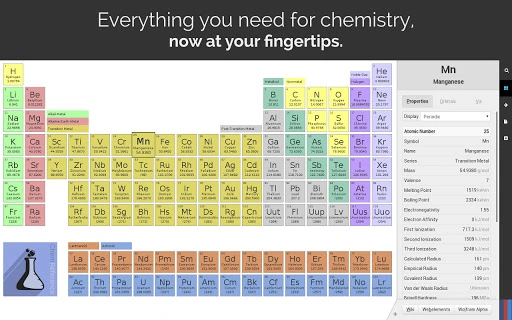
ChemReference is a desktop application designed as a comprehensive chemistry reference tool, offering users instant access to detailed information about the elements. Built with efficiency in mind, it provides a fast workflow for navigating the periodic table, making it ideal for students, educators, and science professionals. The software enables rapid lookup of element properties, supports real-time search functionality, and integrates with authoritative external sources like Wikipedia, WebElements, and Wolfram|Alpha for deeper research. Its primary purpose is to streamline access to chemical data, reducing time spent searching across multiple platforms.
The target audience includes academic users, chemistry learners, and professionals requiring quick, reliable access to elemental data. While the developer is not formally detailed beyond the provided information, the application’s active issue tracking via BitBucket suggests ongoing maintenance and responsiveness to user feedback. Real-world usage scenarios range from classroom teaching and lab work to homework and research. The tool’s focus on usability and speed positions it as a practical addition to any science-focused workflow.
Key Features & Capabilities
- Auto-scaling periodic table – Dynamically adjusts to fit the user’s screen size, maximizing visibility and usability across different display resolutions.
- Real-time searchable interface – Allows instant filtering of elements with live highlighting of matches, supporting both exact and fuzzy search for misspellings.
- Keyboard shortcut navigation – Enables rapid movement and interaction with the periodic table, minimizing mouse dependency and improving workflow speed.
- Trend highlighting – Visualizes property trends (e.g., electronegativity, atomic radius) using color-weighted gradients across the table for intuitive pattern recognition.
- Integrated external links – Provides one-click access to detailed element profiles on Wikipedia, WebElements, and Wolfram|Alpha for expanded research.
- Fast, responsive interface – Designed to minimize lag and deliver smooth interactions during frequent searches and navigation.
These features collectively support efficient data retrieval and enhance learning and research workflows. For example, a student preparing for an exam can quickly locate elements by name or symbol, while a teacher can use trend highlighting to demonstrate periodic trends during a lecture. The integration with external sources ensures users can seamlessly transition from basic data to in-depth analysis without switching applications.
User Interface, Workflow & Performance
The user interface is clean and focused, centering on the periodic table as the primary interaction element. Navigation is intuitive, with clearly labeled sections and visual cues that guide users through the available features. The layout prioritizes accessibility, ensuring that core functions remain within easy reach. Keyboard shortcuts are well-implemented, allowing users to perform common actions—such as searching, zooming, or accessing external links—without interrupting their workflow.
Performance characteristics are not explicitly detailed by the developer. However, based on general software behavior and the application’s design focus on speed, it is expected to operate smoothly on modern systems. The developer did not specify resource usage details, including CPU or RAM consumption. Stability is inferred from the active issue tracking system, indicating a commitment to addressing bugs and improving reliability. No performance benchmarks were provided, but the emphasis on real-time search and responsive interactions suggests optimized execution.
Compatibility & System Requirements
ChemReference is compatible with Windows, Mac, and Linux operating systems, making it accessible to a broad range of users regardless of their preferred platform. The software is distributed as a desktop application with a file size of 150MB, indicating a moderate footprint that should not pose storage concerns on most modern devices. The version number is listed as 1.0.0, suggesting a stable initial release.
Exact system requirements were not listed by the developer. This includes hardware specifications such as minimum RAM, processor speed, or GPU capabilities. Compatibility information is limited to the operating systems mentioned. Users are advised to ensure their system meets general desktop application requirements to avoid installation issues. No specific dependencies or runtime environments were disclosed.
Pros and Cons
Pros
- Fast, responsive interface optimized for quick navigation and search
- Auto-scaling layout adapts to various screen sizes and resolutions
- Real-time, fuzzy-search functionality improves accuracy and usability
- Keyboard shortcuts enhance efficiency for frequent users
- Integrated links to trusted scientific sources for deeper research
- Available at no cost, making it accessible to students and educators
Cons
- No detailed system requirements provided
- Performance metrics such as CPU or RAM usage not disclosed
- Only limited information on update frequency or release schedule
- Developer contact via BitBucket may not be accessible to all users
- Limited visual customization options reported in available documentation
FAQ Section
Is ChemReference available for Windows, Mac, and Linux?
Yes, the software is compatible with Windows, Mac, and Linux operating systems, ensuring broad accessibility across different platforms.
Is ChemReference safe to download and use?
While the developer did not provide explicit security certifications, the application is distributed through official channels and includes a public issue tracker, suggesting responsible development practices. Users are advised to download from trusted sources.
Does ChemReference require an internet connection?
Basic functionality such as viewing the periodic table and searching elements does not require an internet connection. However, accessing external links to Wikipedia, WebElements, and Wolfram|Alpha requires an active connection.
How often are updates released?
The release schedule and update frequency were not specified. Users are encouraged to check the official changelog or the BitBucket issue tracker for the latest developments.
What type of license does ChemReference use?
ChemReference is available for free. The license type was not explicitly stated, but the absence of a paid model suggests it is distributed under a permissive or open-use agreement.
Final Thoughts + CTA
ChemReference delivers a streamlined, powerful experience for anyone working with chemical elements. Its emphasis on speed, search accuracy, and seamless access to external resources makes it a standout tool in the education and science software category. The clean interface, keyboard-driven workflow, and intelligent search features cater to both casual learners and professionals who need quick, reliable data. While some technical details like system requirements and performance metrics are not publicly available, the application’s design and functionality suggest a well-optimized experience.
For students, educators, and science enthusiasts, this tool offers a practical and free solution to a common challenge: accessing accurate, up-to-date element data efficiently. Its cross-platform availability and no-cost access further enhance its appeal. With ongoing support through BitBucket and a focus on user feedback, ChemReference shows promise for continued improvement.
Download ChemReference now







